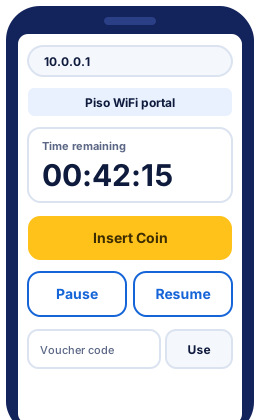
Typed the address and nothing opened? Check your typed address or run the portal troubleshooter.
What is Piso WiFi pause time?
Piso WiFi pause time is the time you've paid for but stopped from counting down. You tap Pause on the vendo's portal, and the clock stops until you tap Resume. It lets you save unused minutes for later instead of losing them.
Pausing is a feature of the vendo software, not of your phone. The owner decides whether you can pause, how many times, and how long paused time lasts. Most vendos keep your paused time on the machine, so you resume on the same vendo. LPB is the exception, because it keeps time in its cloud.
How to pause Piso WiFi time at 10.0.0.1
To pause Piso WiFi time at 10.0.0.1, connect to the vendo's WiFi, open its portal and tap Pause. Your remaining time stops counting, and your internet stops with it, until you resume. 10.0.0.1 Piso WiFi pause time follows the same five steps, whichever system the vendo runs.
-
Connect to the vendo WiFi
Open your phone's WiFi settings and tap the vendo's network. Its name is usually printed on the machine or on a sign beside it. Wait until it says Connected.
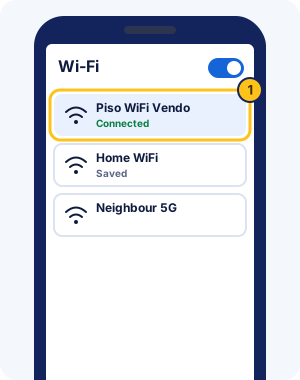
Illustration: the vendo network marked Connected in WiFi settings. -
Open http://10.0.0.1
Type
http://10.0.0.1into the browser's address bar and tap Go, or use the Open 10.0.0.1 button at the top of this guide. Write it with three dots and no spaces, because10.0 0.1searches Google instead of opening the portal.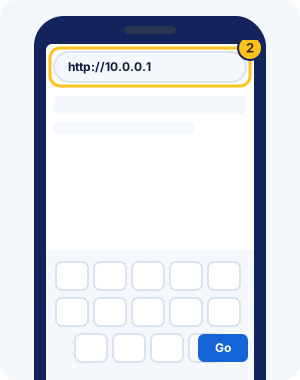
Illustration: the portal address typed into the browser bar. -
Find your time on the portal
The portal page shows your remaining time near the top, next to the Insert Coin button. Your time must be running before you can pause it.
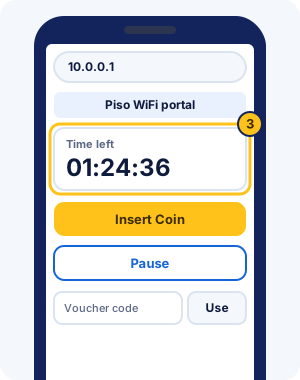
Illustration: a generic portal with the time left near the top. Layouts differ between vendos. -
Tap Pause
Tap the Pause button. Depending on the vendo, it may read Pause, Pause Time or Stop. On AdoPiSoft vendos it can also show how many pauses you have left, such as (10x).
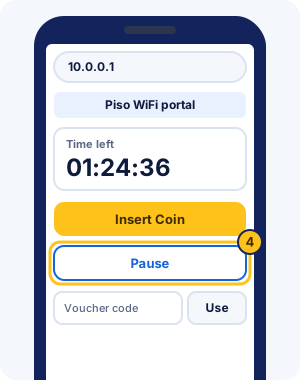
Illustration: the Pause button on a generic portal. -
Check that your time stopped
The portal should now mark your time as paused, and the Pause button turns into Resume. Wait a minute and reload the page: if the time left hasn't changed, the pause worked and you can leave the WiFi.
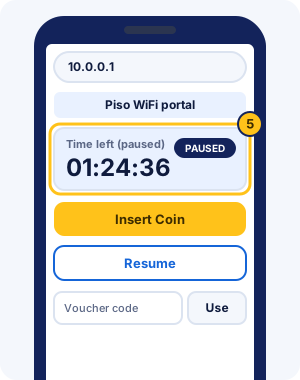
Illustration: paused time on a generic portal. The wording of the paused label differs between vendos.
How to resume your paused time
To resume Piso WiFi time, reconnect to the same vendo WiFi, open http://10.0.0.1 and tap Resume. Your internet comes back and the clock starts again from where you paused.
- Join the vendo's WiFi network again.
- Open
http://10.0.0.1, or tap the sign-in notification if your phone shows one. - Tap Resume. On some vendos the button reads Resume Session, Resume Paused Time or Connect.
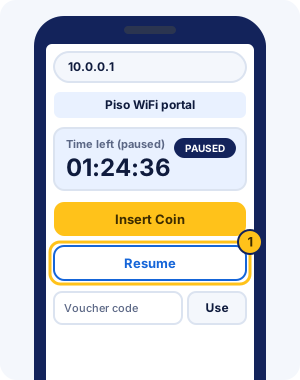
Some vendos resume your time by themselves when you reconnect, because AdoPiSoft and PisoFi owners can switch that on. LPB goes further: it keeps your time in its cloud, so you can pause on one LPB vendo and resume on another LPB vendo.
How to pause Piso WiFi on Android, iPhone and Windows
Pausing Piso WiFi works the same on Android, iPhone and a Windows laptop; only the way the portal opens differs. Phones can open it by themselves when you join the vendo's WiFi.
Piso WiFi pause time Android steps
- Open Settings > Network & internet > Internet and tap the vendo's network.
- Tap the "Sign in to Wi-Fi network" notification, or open Chrome and type
http://10.0.0.1. - Tap Pause. If the portal won't load, turn mobile data off, because Android can switch to it when the WiFi has no internet yet.
Piso WiFi pause time on iPhone
- Open Settings > Wi-Fi and tap the vendo's network.
- Wait for the login screen that opens by itself, or open Safari and type
http://10.0.0.1. - Tap Pause on the portal. Closed the login screen with "Without Internet"? Turn off Auto-Login for that network and rejoin to see it again.
Piso WiFi pause time on Windows 10 and laptops
- Click the WiFi icon at the bottom right of the taskbar, pick the vendo's network and click Connect.
- If a sign-in page opens in your browser, use it. Otherwise open Edge or Chrome and type
http://10.0.0.1in the address bar. - Click Pause on the portal, then check that your time shows as paused before you close the laptop.
Windows 11 and Macs work the same way. Time bought on the laptop belongs to the laptop, so pause it there. If Windows keeps showing "No internet" before you pay, that's normal; the portal still opens.
Is there a Piso WiFi pause time app?
No. None of the systems we checked (LPB, AdoPiSoft, JuanFi and PisoFi) documents a customer pause app. You pause on the vendo's portal in your browser, and no app is needed on Android or iPhone.
What pause apps in app stores actually do
Apps and browser extensions that promise to pause Piso WiFi time can only open the same portal you open in a browser. They can't stop your time themselves, because the clock runs on the vendo. You still tap Pause on the portal.
Some of these apps and extensions ask for wide permissions. The riskiest kind can read your data on every website you visit, so check what an app asks for before you install it.
Is it safe to install a Piso WiFi APK?
Be careful. An APK is an Android app file from outside Google Play. Android blocks it until you allow that source under Install unknown apps. No Piso WiFi maker we checked offers a customer APK, so a "pause APK" isn't from your vendo's maker. Don't install one, and don't type passwords into it.
Apps for vendo owners
Owner apps do exist, but they manage the vendo, not your time as a customer. AdoPiSoft links to its AdoPiSoft Manager App on Google Play, and JuanFi's developer links a JuanFi Manager app. Owners use them to watch the machine remotely.
A one-tap shortcut instead of an app
For app-like access, save 10.0.0.1 to your home screen. In Chrome on Android, use the menu's Install and create shortcut option. In Safari on iPhone, use Share > Add to Home Screen. The one-tap pause shortcut guide has both in steps.
Why there's no Piso WiFi app for iPhone
No vendo maker we checked offers a customer app on any phone, so iPhone isn't missing out. Safari opens the same portal, and a home-screen shortcut gives you one-tap access.
How to tell if an app listing is official
Start from the maker's own website. AdoPiSoft links its Manager App from adopisoft.com, and JuanFi's developer links JuanFi Manager from its project page. A listing that no maker links to isn't theirs, whatever its name or icon says.
Does a pause app work without the vendo WiFi?
No. Your time lives on the vendo, which only answers on its own WiFi. On mobile data, any app or shortcut leads nowhere, so join the vendo network first.
Hoping something pauses your time by itself? Only the vendo can do that; see automatic pausing below.
Which Piso WiFi system is your vendo on?
Open the portal and look for these clues:
- The browser bar shows 10.5.50.1, or the page says JuanFi: JuanFi pause steps
- The browser bar shows 10.5.50.1 and the page does not say JuanFi: MikroTik hotspot guide
- The Pause button shows a count in brackets, such as (10x): AdoPiSoft pause steps
- The "Powered by" line at the bottom says LPB: LPB pause and resume steps
- The "Powered by" line says PisoFi: PisoFi guide
- None of these, or not sure: General pause steps
Piso WiFi vendo pause time rules: what pausing does and doesn't do
Pausing stops your Piso WiFi time from counting down, but the owner's settings still apply. Owners decide how often you can pause, how long paused time lasts and whether vouchers can pause.
- Your time stops, and so does your internet on that vendo, until you tap Resume.
- Paused time can still expire. AdoPiSoft owners set an expiry for each session, and in AdoPiSoft's own example 2 hours of time expires 3 hours after it starts. JuanFi supports pause expiration too.
- Owners can limit pauses. AdoPiSoft's example setting allows 10 pauses for 1 to 2 hours of time, and PisoFi owners can cap how long you may stay paused.
- Voucher time may not pause. On AdoPiSoft, voucher time keeps running once started unless the owner ticked Allow Pause for that voucher.
- Walking out of range doesn't pause your time unless the owner set the vendo to do it, so tap Pause first.
| System | Pause / resume buttons | Pause limits | Auto-pause when you leave | Paused time expires | E-wallet |
|---|---|---|---|---|---|
| AdoPiSoft | Pause / Connect (default theme) | Number of pauses, set by the owner (example: 10) | Owner option | Owner sets an expiry per session | GCash button (owner option) |
| PisoFi | Label set by the owner | Maximum pause time, set by the owner | Owner option | Owner sets how long paused time stays valid | Not documented |
| JuanFi | PAUSE TIME / RESUME SESSION (standard portal) | Not documented | Not documented | Supported (pause expiration) | Not documented |
| LPB | Pause Time / Resume Paused Time (2019 template) | Not documented | Not documented | Not documented; time is kept in the LPB cloud | GCash and Maya |
Sources: AdoPiSoft, PisoFi, JuanFi and LPB documentation, checked Nov 2026. Owners choose the actual values on each vendo.
Piso WiFi pausing questions answered
These are the pausing questions customers ask most, answered from each system's own documentation. The owner's settings decide the details on any one vendo.
How many times can I pause?
As many times as the owner allows. AdoPiSoft owners set a pause limit for each range of time bought, and its example allows 10 pauses for 1 to 2 hours. The count beside the Pause button, such as (10x), shows how many you have left.
How long can my time stay paused?
Until it expires, and the owner sets when that happens. PisoFi owners set a maximum pause time and how long paused time stays valid. AdoPiSoft adds an owner-set expiry on top of the time bought. Ask before a pause of several hours.
Can anything pause my time automatically?
Only the vendo can. AdoPiSoft and PisoFi owners can set sessions to pause when your phone leaves the WiFi and resume when it returns. That's a setting on the machine, not an app on your phone. If you don't know whether it's on, tap Pause yourself.
Can I pause on one vendo and resume on another?
Only on LPB vendos. LPB keeps session time in its cloud, so time paused on one LPB vendo can resume on another. Other systems keep your time on the machine you paid at.
Can I pause voucher time?
Only if the owner allowed it for that voucher. AdoPiSoft owners tick Allow Pause when they create a batch of vouchers. Without it, voucher time keeps running from the moment you start it. The voucher pausing guide covers the details.
Does pausing use data or credits?
No. While you're paused, your internet on that vendo stops, so neither time nor data credit counts down. No system we checked documents a fee for pausing; owners limit how often you can pause instead.
What happens to my time if the vendo loses internet?
On AdoPiSoft vendos with Online Status Checking on, every active session pauses by itself while the internet is down. Customers also can't insert coins until it returns. Sessions there can also carry on by themselves after the vendo restarts, if the owner allows it.
Chrome Piso WiFi pause time: pausing in Chrome and other browsers
Chrome Piso WiFi pause time works the same way as in any browser: open http://10.0.0.1 and tap Pause. Problems start when Chrome changes the address to https or shows a warning, because the portal on the vendo only answers plain http.
Captive portals (the pay-first pages on public WiFi) work by catching your browser's web requests. An https connection can't be caught cleanly, so phones check for portals over plain http. That's why typing the full http://10.0.0.1 works better than letting the browser guess.
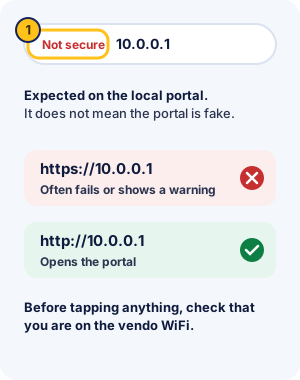
The "Not secure" label is expected
A "Not secure" label next to 10.0.0.1 is normal on a local portal and doesn't mean the portal is fake. It means the page uses plain http. Before you tap anything, check in WiFi settings that you're on the vendo's network. The label alone can't tell you whose page it is.
When Chrome keeps switching to https
Chrome's "Always use secure connections" setting upgrades addresses to https and warns before opening a site that doesn't support it. On its Security Blog (28 Oct 2025), Google announced that Chrome 154, due in October 2026, would turn this setting on by default. Chrome would then ask before opening public sites without https. The same post treats local addresses like 192.168.0.1 as private sites.
- Type
http://10.0.0.1in full, includinghttp://. - If Chrome shows "Connection is not secure", confirm you're on the vendo WiFi, then continue to the site.
- If it still forces https, open Chrome's menu and go to Settings > Privacy and security > Security. Under Always use secure connections, pick the option that warns only for public sites.
Chrome Piso WiFi pause time on Samsung and iPhone
On Samsung phones, Chrome and Samsung Internet both need the full http://10.0.0.1 address. On iPhone, Chrome and Safari behave the same way, and the login screen that opens when you join often saves you from typing at all. If one browser still won't load the portal, try another before you blame the vendo.
Finding the right Piso WiFi portal address
Most vendos open their portal at 10.0.0.1, but each owner's setup decides the address. If 10.0.0.1 shows nothing while you're on the vendo WiFi, the vendo may use another one.
Which address does my vendo use?
- 10.0.0.1 is the usual address, and AdoPiSoft's default.
- 10.5.50.1 is MikroTik's default hotspot address, used by many JuanFi and MikroTik vendos.
- The sign-in screen your phone opens when you join the WiFi always goes to the right address.
- Your phone's WiFi details screen may list the router or gateway address. On a vendo network, that's usually the portal.
Still unsure? Ask the owner, or read other Piso WiFi portal addresses.
Typos and the 1Click shortcut
Most failed visits come from typos such as 10.0 0.1 or 1.0.0.0.1, which send you to a search page. The address checker corrects them. "1Click Piso WiFi" is a third-party browser extension, not vendo software; the 1Click explainer shows a safer home-screen shortcut.
Piso WiFi pause time problems and fixes
Most pause problems have one of five causes. Each has a short answer here and full steps in the Piso WiFi not working guide.
Pause button missing or greyed out
A missing or greyed-out Pause button usually means pausing is switched off for you. The owner may have turned it off, your pauses may have run out, or your voucher time can't pause.
- The owner turned pausing off. AdoPiSoft and PisoFi both have this switch, and AdoPiSoft's default portal hides the button when pausing isn't allowed.
- You've used every pause. When the count beside the button runs out, that session can't pause again.
- You're on voucher time that the owner didn't allow to pause.
- No time is running yet. Insert a coin or enter a voucher first, then look for Pause.
- The page didn't load fully. Reload it, or work through the fixes for a portal that won't open.
Without a Pause button you can't pause from your phone. Ask the owner, who can see the vendo's settings.
Time still running after you paused
Reload the portal and look at the time. If it still drops, the pause didn't go through, often because the page lost connection when you tapped. Tap Pause again and wait for the paused label before you leave.
Insert Coin stopped working
Tapping Insert Coin several times without paying can get your phone suspended. The number of tries and the suspension length are owner settings on AdoPiSoft. Wait it out, or ask the owner to unblock your phone.
Resume doesn't bring your time back
The time may have expired while paused, or the vendo may not recognise your phone. Read paused time problems for each case.
The portal won't open at all
Check that you're on the vendo WiFi with mobile data off, then type http://10.0.0.1 in full. The portal troubleshooter finds the cause in a few taps.
Adding time, logging out, 24/7 and Starlink vendos
Adding time, logging out and the type of vendo don't change how you pause.
Add or extend Piso WiFi time
To add Piso WiFi time, open the portal and tap Insert Coin again, or enter another voucher. JuanFi's standard portal also has an EXTEND TIME button, and AdoPiSoft vendos with customer accounts let you pay from a wallet.
Log out of Piso WiFi
Tap Pause rather than looking for a log-out button. MikroTik-based hotspots also have a /logout page that signs you out; ask the owner whether that keeps your remaining time before you use it.
Piso WiFi 24/7 vendos
A 24/7 Piso WiFi vendo is one the owner leaves on day and night. Pausing works the same at any hour, but owners can still set paused time to expire, so check the portal before a long pause.
Starlink Piso WiFi pause time
Starlink Piso WiFi pause time works like any other vendo. If a vendo gets its internet from Starlink, you still open 10.0.0.1 on its WiFi and tap Pause. The portal runs on the vendo itself, not on Starlink's equipment, so the vendo software sets the pause rules.
Owners planning a Starlink vendo should read Starlink's terms first, because they limit reselling access. The Starlink section of the vendo guide explains what the terms say.
For vendo owners: turning pause time on
Owners switch pausing on in the vendo's admin page, usually at 10.0.0.1/admin. The settings differ by system, but most cover the same three choices.
- Whether customers may pause at all, and whether voucher time may pause.
- How many pauses each session gets, and how long paused time stays valid.
- Whether sessions pause by themselves when a phone leaves the WiFi.
The pause settings guide for owners covers AdoPiSoft, PisoFi, JuanFi and LPB in turn. The same guide lists each system's default admin login, which you should change on first login.
What Piso WiFi is and how it works
Piso WiFi is coin-operated WiFi: you drop coins into a vendo machine and get internet time on its WiFi network. "Piso" is one peso, and each owner sets how many minutes a coin buys.
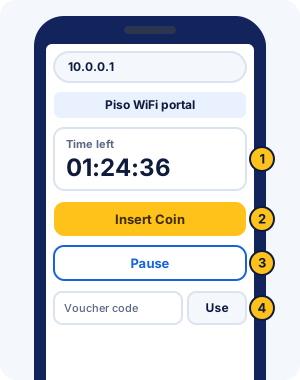
The Piso WiFi login and portal guide explains each part of that screen and how the customer portal differs from the owner's admin page. Vendo owners looking for their settings page should read the 10.0.0.1 admin guide instead.
How Piso WiFi works, in three steps:
- Connect to the vendo WiFi and open the portal at 10.0.0.1.
- Tap Insert Coin, drop your coins in the slot, and confirm on the screen.
- Use your time, pausing whenever you step away.
Instead of coins, you can type a Piso WiFi voucher code bought from the owner into the voucher box. Most vendos run on a small board connected to a WiFi router or access point, often a TP-Link one. The guide to TP-Link Piso WiFi vendos explains who makes what. Many vendos also take e-wallets: LPB supports GCash and Maya payments, and AdoPiSoft owners can add a GCash button. Thinking of running one yourself? Read about starting a Piso WiFi vendo.
What the Piso WiFi client portal is
The client portal is the customer page at 10.0.0.1, where you insert coins, enter vouchers, pause and see your time. It's separate from the owner's admin page at 10.0.0.1/admin, which customers can't use. Some portals open a dashboard address such as 10.0.0.1/client?page=dashboard; the portal address guide explains those.
Piso WiFi vs home broadband
A vendo sells internet by the coin on its shared network. Home broadband is a monthly plan on your own line. Coin WiFi suits short sessions and people without a plan, while a home plan suits heavy daily use.
- You pay per coin or voucher instead of a monthly bill.
- You share the owner's line with other customers, so speed changes through the day.
- You can pause unused time on vendos that allow it, which a home plan doesn't need.
Piso WiFi rates: how many minutes a peso buys
Piso WiFi rates are set by each owner, so a peso buys different amounts of time on different vendos. AdoPiSoft's example rates for the Philippines are ₱1 for 5 minutes, ₱5 for 30 minutes and ₱10 for 1 hour. Most owners post their own rates on the machine, and AdoPiSoft's default portal has a View Rates button.
- Time-based rates give you minutes or hours for each coin, counted down while you're connected and not paused.
- Data-based rates give you an amount of data instead; LPB lets owners sell either.
- Vouchers and promos, such as JuanFi's promo rates, can give a better deal for bigger amounts.
Pros and cons of Piso WiFi
Piso WiFi suits short, cheap internet sessions near where you are. Its limits come from sharing one connection and one owner's rules.
What works well:
- You pay only for the time you use, starting from a single coin, with no plan or contract.
- You can pause to save unused time, on vendos that allow it.
What to watch for:
- Speed depends on the owner's internet line and on how many people share it.
- Pause limits, expiry and rates change from vendo to vendo, so read the portal before you pay a lot.
- It's a public network, so use apps and sites that show https for logins and payments.
Piso WiFi pause time FAQ
Paano mag pause ng piso wifi?
To pause Piso WiFi, stay connected to the vendo WiFi, open http://10.0.0.1 in your browser and tap Pause. Tap Resume on the same page when you want your internet back. If the Pause button is missing, the owner may have switched pausing off for your session.
Can I pause Piso WiFi without the Pause button?
No. Pausing is a setting on the vendo, and the button is the only way customers can use it. Some systems pause your time automatically when you leave the WiFi, but only if the owner turned that on. Ask before you walk away.
Does turning off WiFi pause my time?
Not by itself. On most vendos your time keeps running until you tap Pause. AdoPiSoft and PisoFi owners can set sessions to pause when a phone disconnects, but you can't see that setting, so tap Pause to be sure.
How to pause time in Piso WiFi?
Connect to the vendo's WiFi, open http://10.0.0.1 and tap Pause beside your time. Check that the portal shows your time as paused before you walk away.
How do I see how much Piso WiFi time I have left?
Open http://10.0.0.1 while connected. The portal shows your remaining time near the top, and it marks the time as paused when you pause. Some systems have a separate status page; checking your remaining time covers those.
Will pausing cut my call or download?
Yes. Pausing stops your internet on that vendo, so a Messenger call drops and a download stops until you tap Resume. Finish or save what you're doing first, then pause.
Paano mag pause ng piso wifi sa Chrome?
In Chrome, open http://10.0.0.1 while you're on the vendo WiFi and tap Pause. Type the address with http:// in front so Chrome doesn't switch it to https.
Can I pause Piso WiFi on a laptop?
Yes. Join the vendo WiFi on the laptop, open http://10.0.0.1 in any browser and click Pause. Time bought on the laptop belongs to the laptop, so pause it there, not on your phone.
Can I share my Piso WiFi time with another phone?
Only if the vendo supports it. AdoPiSoft's default portal can give you a passcode that links sessions across devices, and AdoPiSoft owners can let several users share one voucher. On other vendos, ask the owner.
Why can't the portal find my paused time?
Your phone may be showing the vendo a new WiFi address. Android and iPhone both use private addresses that can change, and vendos often recognise you by that address. Set the private address to fixed for the vendo network, then ask the owner if the time is still missing.
Can the vendo owner pause my time for me?
On AdoPiSoft vendos, yes. The owner can pause, start, add time to or delete a session from the admin page. Other systems don't document this, so ask the owner in person.
Is Piso WiFi safe to use?
Treat it like any public WiFi. The portal only needs coins or a voucher code, so never type an email password or bank PIN into it. For logins and payments elsewhere, use sites and apps that show https.