What 1Click Piso WiFi is
1Click Piso WiFi is a third-party extension for the Chrome browser that adds quick buttons for the 10.0.0.1 portal and admin pages. It isn't a vendo system, it doesn't run on any vendo, and it isn't affiliated with any Piso WiFi vendor.
The buttons open the same addresses you can type yourself. Pausing still happens on your vendo's own portal, with its own rules.
Why to be careful with browser extensions
Browser extensions can ask to read data from the pages you visit. Chrome's own help pages rank access to all your data on the websites you visit as the highest-risk permission. An extension with it can see almost anything you do online.
- Read the permission warning before you install anything, and cancel if it asks for more than it needs.
- Install extensions only when they do something a bookmark can't.
- Remove extensions you no longer use from the browser's extensions page.
Opening 10.0.0.1 needs no permissions at all. A shortcut on your home screen gets you there in one tap.
Make your own one-tap pause shortcut
To make a one-tap pause shortcut, open http://10.0.0.1 on the vendo WiFi. Then add the page to your home screen from the browser menu.
Android: Chrome
- Connect to the vendo WiFi and open
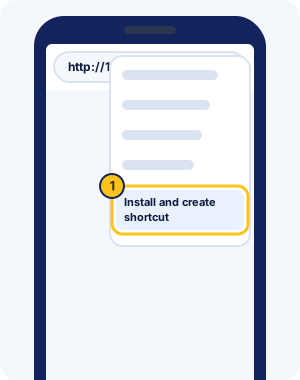
http://10.0.0.1in Chrome. - Tap More (the three dots) to the right of the address bar.
- Tap Install and create shortcut, then Create shortcut.
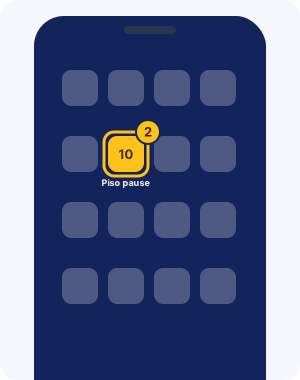
- Rename the shortcut if you like, such as "Piso pause", and tap Add.
iPhone: Safari
- Connect to the vendo WiFi and open
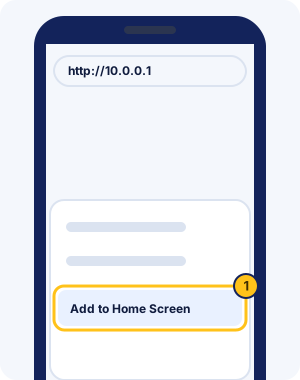
http://10.0.0.1in Safari. - Tap Share, then scroll down and tap Add to Home Screen. If it's missing, tap Edit Actions to add it.
- Name the icon and tap Add.
Pausing with your shortcut
Pausing with your shortcut takes two taps: the icon, then Pause on the portal. Make sure you're on the vendo WiFi first, because the shortcut points to a local address.
If the shortcut opens a blank page or a warning, the fixes for a portal that won't load walk through each cause. For the pause button itself, see pausing and resuming your time.
1Click Piso WiFi FAQ
Is 1Click Piso WiFi an app?
No. It's a browser extension for desktop Chrome that adds buttons for 10.0.0.1. It isn't made by, or affiliated with, any Piso WiFi vendor, and your vendo doesn't run it.
Is the 1Click Piso WiFi extension safe?
We can't vouch for any third-party extension. Check the permissions it asks for before installing, and remember that a home-screen shortcut does the same job with no permissions at all.
Does the shortcut work on mobile data?
No. The shortcut opens 10.0.0.1, which only exists on the vendo's WiFi. Connect first, then tap it.
What is "10.0 0.0 1 click piso wifi"?
It's a mistyped 10.0.0.1 plus the word click. The portal address is http://10.0.0.1, and the 10.0.0.1 portal guide fixes other typos.
What's the fastest way to pause Piso WiFi?
Save http://10.0.0.1 to your home screen, then tap the icon and Pause. That's two taps, with no extension or app to install.
How do I remove a browser extension?
Open your browser's extensions page from its menu, find the extension and choose Remove. Remove any extension you don't recognise or no longer use.
Is One Click Piso WiFi the same as 1Click?
Yes. It's the same third-party browser extension, written two ways. It isn't a vendo system, and it pauses nothing itself: it only opens the 10.0.0.1 portal.
Will my shortcut work on another vendo?
Yes, if that vendo also uses 10.0.0.1. Vendos on MikroTik routers often use 10.5.50.1, so make a second shortcut for those.
Why does my shortcut open a search page?
It was probably saved with a typo or with https. Delete it, open http://10.0.0.1 on the vendo WiFi, and save the shortcut again from that page.
Can vendo owners make a shortcut to the admin page?
Yes. Open http://10.0.0.1/admin on the vendo WiFi and save it the same way. Keep it off customers' phones, and don't save the admin password in a shared browser.