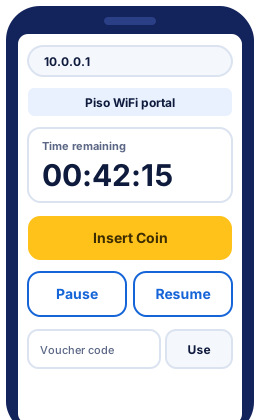
Fix the address you typed
Most mistyped addresses mean 10.0.0.1. Find yours in the typo table below, then use the Open 10.0.0.1 button.
10.0.0.1 typos and what they should be
Every typo below should be 10.0.0.1. Each one fails for a small reason: a space, a missing dot, an extra zero or https. The browser then treats your text as a search instead of an address.
| You typed | Should be | What's wrong |
|---|---|---|
10.0 0.1 | 10.0.0.1 | Has a space where a dot should be |
1.0.0.0.1 | 10.0.0.1 | Splits the 10 at the start into 1.0 |
10.0.0.0.1 | 10.0.0.1 | Has an extra 0 |
10.0.01 | 10.0.0.1 | Is missing a dot |
10.10 0.1 | 10.0.0.1 | Has a space where a dot should be, has an extra 1 |
1.0.0.0.10 | 10.0.0.1 | Splits the 10 at the start into 1.0, ends in 10 instead of 1 |
10 0.0.1 | 10.0.0.1 | Has a space where a dot should be |
1.0.0.0.0.1 | 10.0.0.1 | Splits the 10 at the start into 1.0, has an extra 0 |
10.00.1 | 10.0.0.1 | Is missing a dot |
10.0-0.0-1 | 10.0.0.1 | Uses a dash instead of a dot, has an extra 0 |
10.0.0. | 10.0.0.1 | Ends with an extra dot, is missing the 1 at the end |
10.0.0.01 | 10.0.0.1 | Has an extra 0 |
10..0.0.1 | 10.0.0.1 | Has two dots in a row |
10.0.0.q | 10.0.0.1 | Has the letter q instead of the number 1 |
10,0,0,1 | 10.0.0.1 | Uses commas instead of dots |
www.10.0.0.1 | http://10.0.0.1 | Has www. in front, which only belongs on website names |
http //10.0.0.1/ | http://10.0.0.1 | Has a broken http:// at the start |
10.0.0.1/admin | 10.0.0.1 | Is the right address; /admin is the owner page, not the pause page |
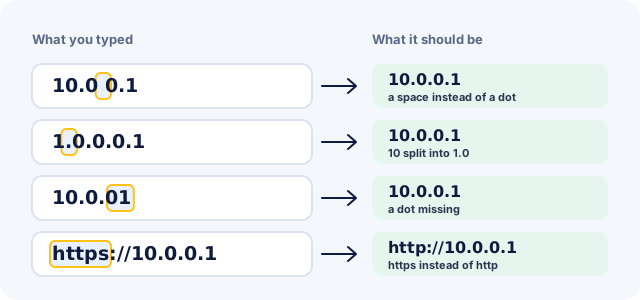
Most of these typos start on a phone keyboard, where the dot sits beside the space bar. One slip gives 10.0 0.1, and a dot tapped too early turns 10 into 1.0. If the address won't open even when typed right, the problem is the connection, not the typing; the portal troubleshooter finds which.
How to open 10.0.0.1 on Android, iPhone and a laptop
To open 10.0.0.1, connect to the vendo's WiFi, then type http://10.0.0.1 into your browser's address bar. The steps differ only in where each device puts the WiFi settings and the address bar.
Open 10.0.0.1 on Android
- Open Settings > Network & internet > Internet (Wi-Fi on some brands) and tap the vendo's network.
- If a "Sign in to Wi-Fi network" notification appears, tap it. The portal opens there.
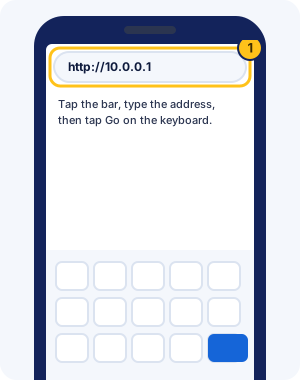
- Otherwise open Chrome, tap the address bar at the top, type
http://10.0.0.1and tap Go.
Open 10.0.0.1 on iPhone
- Open Settings > Wi-Fi and tap the vendo's network.
- Wait a few seconds: iPhone often opens the portal in a login screen by itself.
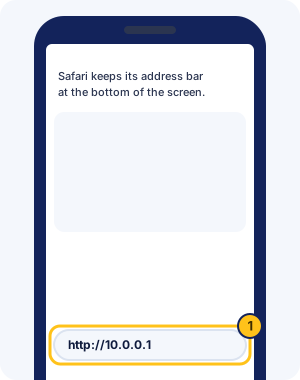
- If it doesn't, open Safari, tap the address bar (at the bottom of the screen on recent iPhones), type
http://10.0.0.1and tap Go.
Open 10.0.0.1 on a laptop
- Click the WiFi icon in the taskbar or menu bar and join the vendo's network.
- Open any browser, click the address bar, type
http://10.0.0.1and press Enter.
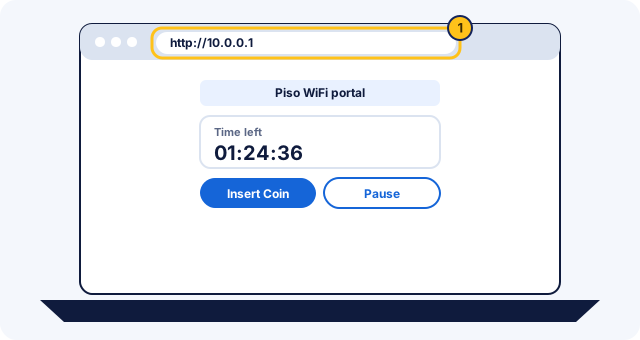
Open the portal often? A 10.0.0.1 home-screen shortcut gets you there in one tap.
What 10.0.0.1 is, and why it only works on the vendo WiFi
10.0.0.1 is a private IPv4 address. Addresses from 10.0.0.0 to 10.255.255.255 are reserved for local networks (RFC 1918), and internet providers don't route them. So 10.0.0.1 only reaches a device on the network you're connected to.
On a Piso WiFi vendo, that device is the vendo itself. Its portal answers at 10.0.0.1 inside the vendo's own WiFi. Each vendo runs its own small network, so the same address works at a sari-sari store in Cebu and a boarding house in Quezon City. On mobile data, your phone talks to your network provider instead, and 10.0.0.1 leads nowhere.
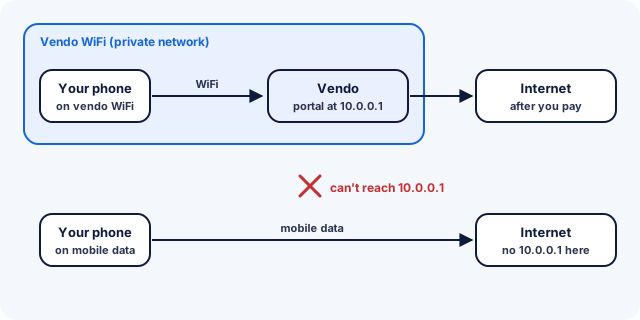
Other Piso WiFi portal addresses
Most vendos use 10.0.0.1, but the address belongs to each owner's setup. AdoPiSoft uses 10.0.0.1 by default and lets owners change it. Vendos built on MikroTik routers, including JuanFi, often use 10.5.50.1, MikroTik's default hotspot address, with pages such as 10.5.50.1/status for your remaining time.
- Address bar shows 10.5.50.1: see JuanFi and MikroTik vendos.
- LPB vendos: LPB doesn't publish a fixed address; read the LPB Piso WiFi guide.
- Neither address works: use the sign-in screen your phone opens when you join, or ask the owner.
10.0.0.1 on home routers
10.0.0.1 is also a common home-router address. Some internet providers' gateways, such as Xfinity's, open their settings page at http://10.0.0.1. That page is the router's admin screen, not a Piso WiFi portal. Vendo owners looking for their admin page can follow the vendo admin page guide.
10.0.0.1 Piso WiFi FAQ
Is it 10.0.0.1 or 10.0.0.0.1?
It's 10.0.0.1, with four numbers and three dots. 10.0.0.0.1 has five numbers, which no address can have, so the browser searches for it instead of opening the portal.
What does 1.0.0.0.1 mean?
1.0.0.0.1 is 10.0.0.1 with an extra dot inside the 10. It's one of the most common typos. Type 10.0.0.1 instead.
Why does 10.0.0.1 open Google instead of the portal?
The browser didn't recognise what you typed as an address, usually because of a space or a missing dot, so it ran a search. Type http://10.0.0.1 in full and the browser goes straight to the address.
Why does 10.0.0.1 say "This site can't be reached"?
Your phone isn't reaching the vendo: it may be on mobile data, on another WiFi, or not connected yet. Work through the Piso WiFi not working fixes in order.
Do I need to type http:// before 10.0.0.1?
It helps. Some browsers try https first, and the portal on the vendo only answers plain http, so typing http://10.0.0.1 avoids a warning or a blank page.
Can I open 10.0.0.1 on mobile data?
No. 10.0.0.1 lives on the vendo itself, and mobile data connects you to your network provider instead, where that address leads nowhere. Connect to the vendo WiFi first.
What is 10.0.0.1/admin?
It's the owner's admin page on systems such as AdoPiSoft and PisoFi. Customers don't need it to pause. Owners can read the 10.0.0.1 admin login guide.
Is 10.0.0.1 the same on every vendo?
The address often is, but each vendo answers it with its own portal. Your time stays on the vendo where you paid, except on LPB vendos, which share time through LPB's cloud.
Why does 10.0.0.1 ask for a username and password?
You've probably opened an owner page, such as 10.0.0.1/admin, or a router's login. Customers never need a login there. Open http://10.0.0.1 on its own and pay with coins or a voucher.
Is 10.0.0.1 safe to open?
Yes, on the vendo WiFi. It's a private address that only reaches the vendo on your network. The page uses plain http, so never type an email, social media or bank password into it.