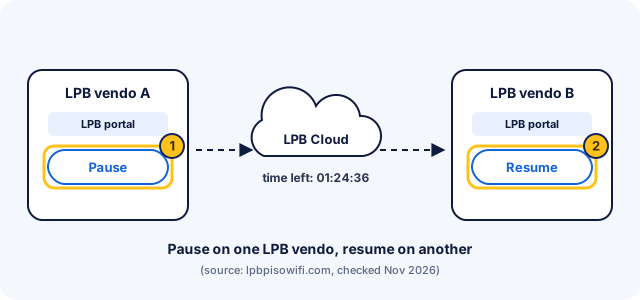
Your LPB time isn't tied to one machine. LPB stores session time in its cloud. Pause on one LPB vendo and resume on a different LPB vendo, anywhere in the Philippines.
| Official site | lpbpisowifi.comSource: LPB website |
|---|---|
| Portal address | Not published by LPB; most vendos use 10.0.0.1Source: LPB website (no address listed) |
| Pause and resume | Pause Time and Resume Paused Time on many portals; owners can change labelsSource: LPB's 2019 portal template |
| Where your time is kept | LPB Cloud: resume on any LPB vendo in the PhilippinesSource: LPB website |
| Vouchers | Codes with custom time or data limits, made by the ownerSource: LPB website |
| Payments | Coins, plus GCash and Maya on vendos that enable themSource: LPB website |
How to pause LPB Piso WiFi time
To pause LPB Piso WiFi time, open the vendo's portal while connected to its WiFi and tap Pause Time. On many LPB portals the buttons read Pause Time and Resume Paused Time, but owners can customise the portal, so yours may look different.
-
Join the LPB vendo's WiFi
Pick the vendo's network in WiFi settings and wait for Connected.
-
Open the LPB portal
Type
http://10.0.0.1, or tap the sign-in notification your phone shows. If neither opens the portal, ask the owner which address their vendo uses, since LPB has no single published one. -
Tap Pause Time
The button sits under your time and Insert Coin on most layouts. After you tap it, the portal marks your time as paused.
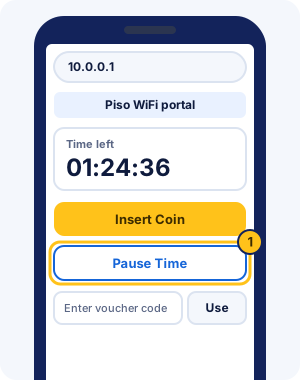
Illustration: a generic portal using the button names from LPB's 2019 template. LPB lets owners change colours, logos and layout, so real LPB portals vary.
LPB Piso WiFi 10.0.0.1 login: finding the portal
LPB Piso WiFi login is the vendo's portal, and LPB doesn't publish one address for it. Try http://10.0.0.1 first, since most vendos use it, or tap the sign-in notification your phone shows when you join.
On most vendos, the 10.0.0.1 LPB Piso WiFi portal opens as soon as you join. Customers don't need a username or password on it; you sign in by paying with coins, a voucher or an e-wallet. A page asking for an admin login is the owner's side, covered in the 10.0.0.1 admin guide for owners.
Resume LPB time on the same or another LPB vendo
LPB Piso WiFi keeps your remaining time in the LPB Cloud. You can resume on the vendo where you paused or on any other LPB vendo. A canteen vendo at school and a sari-sari store vendo near home can share the same time, as long as both run LPB.
- Connect to any LPB vendo's WiFi.
- Open the portal at
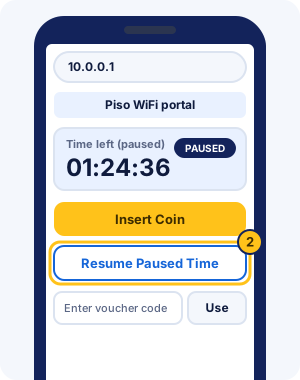
http://10.0.0.1or through the sign-in notification. - Tap Resume Paused Time, or Resume on newer portals.
LPB's site doesn't mention pause limits, and owners control the settings on their own vendos. A vendo that runs different software, such as AdoPiSoft or JuanFi, can't see your LPB time.
LPB Piso WiFi pause time check: your remaining time
Your remaining LPB time shows on the portal page. LPB's 2019 template labels it TIME, and shows PAUSED TIME while you're paused; newer LPB versions don't document their wording. For status pages on other systems, see how to check your remaining time.
LPB vouchers and e-wallet payments
LPB vouchers are codes the owner generates with custom time or data limits. On many LPB portals you type the code into the box that reads "Enter voucher code here.." and confirm. Codes come only from the owner of that vendo; no shared code works everywhere, as the voucher code guide explains.
- Owners can sell time at hourly rates or data with data-based rates.
- LPB supports GCash and Maya payments, so you can pay on some vendos without coins.
- In LPB's 2019 template, owners could switch off Pause Time for customers using a voucher. If Pause disappears after you enter a code, ask the owner.
What LPB Piso WiFi is
LPB Piso WiFi is vendo management software that owners license through lpbpisowifi.com. Owners run it on a small computer board or a supported router, connected to the coin slot and an access point. Its website names no company behind it and points support questions to LPB's Facebook page.
LPB lists these as its most commonly used hardware:
- Raspberry Pi 3/4
- Raspberry Pi 5
- Orange Pi One/PC
- Orange Pi Zero 3
- Orange Pi 5
- Newifi 3 D-2 / Newifi D2
- PC version
- MXQ Android box
- Ruijie EW1200G PRO
- Linksys EA8300
| Plan | Price | Users | Validity |
|---|---|---|---|
| Lite | ₱400 (₱250 promo) | 50 users limit (excluding offline users) | 1 year |
| Premium | ₱700 (₱500 promo) | unlimited users | 1 year |
Licences are tied to one machine and are non-refundable once activated. Versions 15.3 and below keep lifetime licences. Promo prices change, so check lpbpisowifi.com before buying.
LBS Piso WiFi is usually a typo for LPB Piso WiFi, and so is LBP Piso WiFi.
Common LPB Piso WiFi problems
Most LPB problems fall into two groups: reaching the portal, and pausing or resuming. Each fix below starts with what you can check on your phone.
LPB login problems
- The portal won't open: check that you're on the vendo WiFi with mobile data off, then follow the LPB portal not opening fixes.
- 10.0.0.1 shows nothing: LPB has no single published address, so use the sign-in screen your phone shows, or ask the owner.
- Chrome warns "Not secure": that's normal for the local portal; the Chrome pause guide explains what to check.
- The admin login fails: that's the owner's page, covered in the owners section below.
LPB Piso WiFi pause time not working
- Pause Time is missing: the owner may have turned pausing off, or your voucher can't pause. Ask the owner.
- Your time keeps dropping after a pause: reload the portal, tap Pause Time again and wait for PAUSED TIME before you leave.
- Your time doesn't show on another vendo: that vendo probably isn't running LPB. LPB's cloud time works only between LPB vendos.
- Your time is gone on the same vendo: your phone may be showing a new private WiFi address. Set it to fixed for the vendo network and reload.
Tips for using LPB Piso WiFi
- Tap Pause Time before you walk away, and check the portal shows your time as paused.
- Note which vendos near you run LPB, so you know where your cloud time can resume.
- Keep your phone's private WiFi address fixed for vendo networks you use often.
- Buy voucher codes only from the vendo's owner, since codes work only where they were made.
- Ask the owner about pause limits and expiry before you pause for a long time.
LPB Piso WiFi admin login and features for owners
LPB's website lists neither an admin page address nor a default login. Other Piso WiFi guides widely report the login below, at 10.0.0.1/admin. Your installer may have changed it.
| System | Where | Username | Password |
|---|---|---|---|
| LPB Piso WiFi | 10.0.0.1/admin | admin | 123456789Source: other Piso WiFi guides. LPB doesn't publish this login itself. Installers often change it. |
What LPB's admin features include
LPB's licence page lists these features. Lite covers them for up to 50 users, and Premium removes the user and sub-account limits.
- Remote monitoring of the vendo, plus sub-accounts for helpers.
- VLAN support with auto-select coin slot, for extra access points and coin slots.
- PisoNet, for coin-operated computers, and phone rental.
- E-loading and cash-in, so customers can buy load at the vendo.
- PPPoE, for internet plans that need a username and password.
- GCash and Maya direct payment.
LPB doesn't publish its admin menus, so ask your installer where each setting sits.
Change the default login on first sign-in and keep the new one to yourself, because anyone on your WiFi can reach the login screen. Locked out? LPB points support questions to its Facebook page. The forgotten admin password guide covers what else to try.
Which Piso WiFi system is your vendo on?
Open the portal and look for these clues:
- The browser bar shows 10.5.50.1, or the page says JuanFi: JuanFi pause steps
- The browser bar shows 10.5.50.1 and the page does not say JuanFi: MikroTik hotspot guide
- The Pause button shows a count in brackets, such as (10x): AdoPiSoft pause steps
- The "Powered by" line at the bottom says LPB: LPB pause and resume steps
- The "Powered by" line says PisoFi: PisoFi guide
- None of these, or not sure: General pause steps
LPB Piso WiFi FAQ
What is LPB Piso WiFi?
LPB Piso WiFi is vendo software that owners install on boards such as a Raspberry Pi or Orange Pi to run a coin-operated WiFi machine. Customers see it as the portal where they insert coins, pause and resume. Its official site is lpbpisowifi.com.
Can I pause on one LPB vendo and resume on another?
Yes. LPB stores your session time in the LPB Cloud, so your remaining time follows you to any LPB vendo in the Philippines. The other machine must run LPB too.
What is the IP address of LPB Piso WiFi?
LPB doesn't publish a fixed portal address. Most vendos open at http://10.0.0.1, so try that first, or use the sign-in screen your phone shows when you join the WiFi.
What is the LPB admin password?
LPB doesn't publish one, but Piso WiFi guides widely report username admin and password 123456789 at 10.0.0.1/admin. Installers often change it, so ask yours if it fails. Change it on first login.
How do I pause LPB Piso WiFi on iPhone or Android?
The same way on both: join the LPB vendo's WiFi, open the portal from the sign-in screen or at http://10.0.0.1, and tap Pause Time. Turn mobile data off if the portal won't load.
How do I reset LPB Piso WiFi?
Resetting is an owner job, and we found no official LPB reset steps to verify. Contact your installer, or LPB through the Facebook page its website names for support.
Does LPB paused time expire?
LPB's website doesn't say. Owners control the settings on their own vendos, so ask before a long pause. Check your time on the portal when you come back.
Who do I contact about a problem with an LPB vendo?
Start with the vendo owner, who controls your time, rates and vouchers. Owners with software problems can reach LPB through the Facebook page its website names for support.
Why does my LPB portal look different from another one?
LPB lets owners change the portal's colours, logos and layout. Button names can differ too, so look for Pause, Pause Time or a similar label beside your time.
How do I get an LPB voucher code?
Buy one from the vendo owner. Owners create LPB voucher codes with their own time or data limits, and no code works on a vendo it wasn't made for.