| JuanFi pause and resume | PAUSE TIME, then RESUME SESSION, on the standard portalSource: JuanFi template v4.3 |
|---|---|
| JuanFi time display | Remaining Time, Expiration Time and Data Usage on the status pageSource: JuanFi template v4.3 |
| PisoFi admin page | 10.0.0.1/adminSource: PisoFi build guide (2020) |
| PisoFi pause | Owner sets on or off, maximum pause time and auto pause/resumeSource: PisoFi features page |
| MikroTik hotspot address | 10.5.50.1 (setup default)Source: MikroTik documentation |
| MikroTik time check | 10.5.50.1/status shows session time leftSource: MikroTik documentation |
JuanFi Piso WiFi
JuanFi is free, open-source vendo software by Ivan Julius Alayan that adds a coin slot to a MikroTik hotspot router. Its portal is MikroTik's own hotspot pages, so the address is whatever the owner set, often MikroTik's default of 10.5.50.1.
Pause and resume on JuanFi
- Join the vendo's WiFi and open the portal, or tap the sign-in notification.
- On the status page, tap PAUSE TIME. The page then says "You're currently on pause".
- To continue, open the portal again and tap RESUME SESSION.
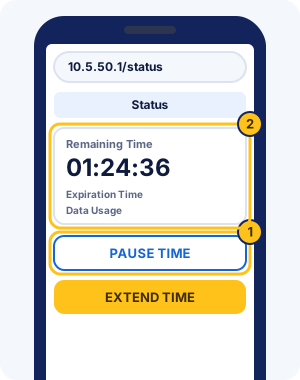
The status page also shows Remaining Time, Expiration Time and Data Usage, and an EXTEND TIME button adds time. JuanFi supports pause expiration, so paused time can run out after the owner's limit. Vouchers go into the box that asks you to "enter voucher code if have existing".
Button names come from JuanFi's standard template (v4.3); the official template titles its pages JuanFi Login Portal and JuanFi - Status.
JuanFi admin panel and default login
Owners set up a JuanFi vendo board through its own setup WiFi, not the customer portal. Join the "JuanFi Setup" network, then open 172.217.28.1/login in a browser.
| System | Where | Username | Password |
|---|---|---|---|
| JuanFi | 172.217.28.1/login on the "JuanFi Setup" WiFi | admin | adminSource: github.com. From the JuanFi developer's setup guide on GitHub. |
The board talks to the MikroTik router through its own MikroTik user. JuanFi's guide asks owners to change that user's password and the operator account's password to keep strangers out of the vendo.
| System | Where | Username | Password |
|---|---|---|---|
| JuanFi | pisonet | abc123Source: github.com. The MikroTik user the vendo board uses to talk to the router. |
PisoFi
PisoFi is vendo software from the PisoFi Team (pisofiph.com) for Raspberry Pi and Orange Pi boards, with ESP8266 modules for sub vendos. The owner's admin page is at 10.0.0.1/admin, according to PisoFi's 2020 build guide.
Pause and resume on PisoFi
PisoFi lets each owner choose which portal buttons to show, including pause, so the label varies. Open http://10.0.0.1 and look for the pause button beside your time.
- Pausing can be switched on or off, with a cap on how long you may stay paused.
- Paused time can be set to expire after a set period.
- The vendo can pause you automatically when you leave the WiFi and resume you when you return.
PisoFi admin login
PisoFi's build guide gives this default for the admin page at 10.0.0.1/admin. New devices are then registered to the owner's PisoFi account.
| System | Where | Username | Password |
|---|---|---|---|
| PisoFi | 10.0.0.1/admin | administrator | admin12345Source: pisofiph.com. From PisoFi's March 2020 build guide. |
Vouchers are called WiPass, and the portal shows each user's time or data for the session. PisoFi runs offline apart from licence checks. Its 2019 FAQ listed ₱1,000 for a main vendo licence and ₱300 per sub vendo. Its public documentation dates from 2019 and 2020, so newer versions may differ.
MikroTik HotSpot vendos (10.5.50.1)
MikroTik HotSpot is the login-page feature of MikroTik routers, and 10.5.50.1 is its default address when an owner runs the hotspot setup. Many Piso WiFi hotspot vendos, JuanFi included, build their portal on it.
10.5.50.1/loginis the sign-in page, where vendos such as JuanFi put their Insert Coin button.10.5.50.1/statusshows your session, including time left, once you're signed in.10.5.50.1/logoutends the session.
MikroTik's documentation covers these sign-in, status and logout pages; pause buttons come from the vendo software built on top. The address can be changed, so if 10.5.50.1 doesn't open, use the sign-in screen your phone shows. The guide to /status pages explains time checks on these vendos.
MikroTik router login
The router itself has a separate owner login, used in WinBox or the WebFig web page. MikroTik's documentation gives this default and warns that a blank password lets anyone control the router.
| System | Where | Username | Password |
|---|---|---|---|
| MikroTik HotSpot | the router (WebFig, WinBox) | admin | none (blank)Source: help.mikrotik.com. Some newer MikroTik devices ship with a password printed on the label instead. |
Which Piso WiFi system is your vendo on?
Open the portal and look for these clues:
- The browser bar shows 10.5.50.1, or the page says JuanFi: JuanFi pause steps
- The browser bar shows 10.5.50.1 and the page does not say JuanFi: MikroTik hotspot guide
- The Pause button shows a count in brackets, such as (10x): AdoPiSoft pause steps
- The "Powered by" line at the bottom says LPB: LPB pause and resume steps
- The "Powered by" line says PisoFi: PisoFi guide
- None of these, or not sure: General pause steps
If your vendo shows another brand, the general steps on the home page usually apply: see how to pause any Piso WiFi vendo.
JuanFi, PisoFi and MikroTik FAQ
What is 10.5.50.1?
10.5.50.1 is the default hotspot address on MikroTik routers, which JuanFi and other vendos run on. Like 10.0.0.1, it only works while you're on the vendo's WiFi.
How do I pause on 10.5.50.1?
Open http://10.5.50.1 on the vendo WiFi and tap the pause button the owner's portal shows; on JuanFi's standard portal it reads PAUSE TIME. Plain MikroTik pages show status and logout, so pausing depends on the vendo software.
Is JuanFi free?
JuanFi is free and open source for owners. Its site says it may not be sold on its own, only together with a vendo kit.
What is PisoFi WiPass?
WiPass is PisoFi's name for vouchers. Owners can let you convert leftover time into a WiPass code.
How do I check my time on JuanFi?
Open the portal while connected and look at the status page. JuanFi's standard design shows Remaining Time, Expiration Time and Data Usage there.
Does JuanFi have an app?
Not for customers, who pause on the portal in a browser. JuanFi's developer links a JuanFi Manager app on Google Play for owners to run their vendo.
Can I resume JuanFi time on another vendo?
JuanFi doesn't document it, and each JuanFi vendo runs on its own MikroTik router. Plan to resume on the vendo where you paused. LPB is the system that syncs time between vendos.
Why does 10.5.50.1/status show a different page?
MikroTik shows the status page only while you're signed in. If you aren't, the same address shows a different page instead. Sign in through the portal first, then open /status again.
What if I forgot my MikroTik router password?
MikroTik says a forgotten password can't be recovered. You have to reset the router's configuration or reinstall its system, then set up the hotspot again.
Is PisoFi still updated?
We can't confirm it. PisoFi's public documentation dates from 2019 and 2020, so features on newer vendos may differ from what it describes.